
Axondigi Owner SMS
Axondigi provides an AI receptionist service to small businesses. The Axondigi Owner SMS program is a two-way text service for the business owner who operates each Axondigi account. We send you notifications about your AI receptionist and business activity, for example an alert when the AI cannot answer a customer’s question, new Google reviews, booking and request notifications, and account notices. You can reply by text to answer your customers, ask about your account, and make simple updates to your business profile. We message only owners who have personally opted in.
Who receives messages
Only the business owner who created and signed in to an Axondigi account, and who has personally opted in, receives messages. We never message a number unless that number’s own account owner enrolled it.
How to opt in
Owners opt in from inside their own Axondigi dashboard:
- Sign in to your dashboard at beaver.axondigi.com.
- Open Account > Notifications > SMS.
- Enter your mobile number.
- Check the consent box (it is unchecked by default) to confirm you agree to receive and exchange text messages.
- Click Enable SMS. You will receive a one-time confirmation text.
The opt-in form inside the Axondigi owner dashboard (Beaver), with the consent box owners must actively check:
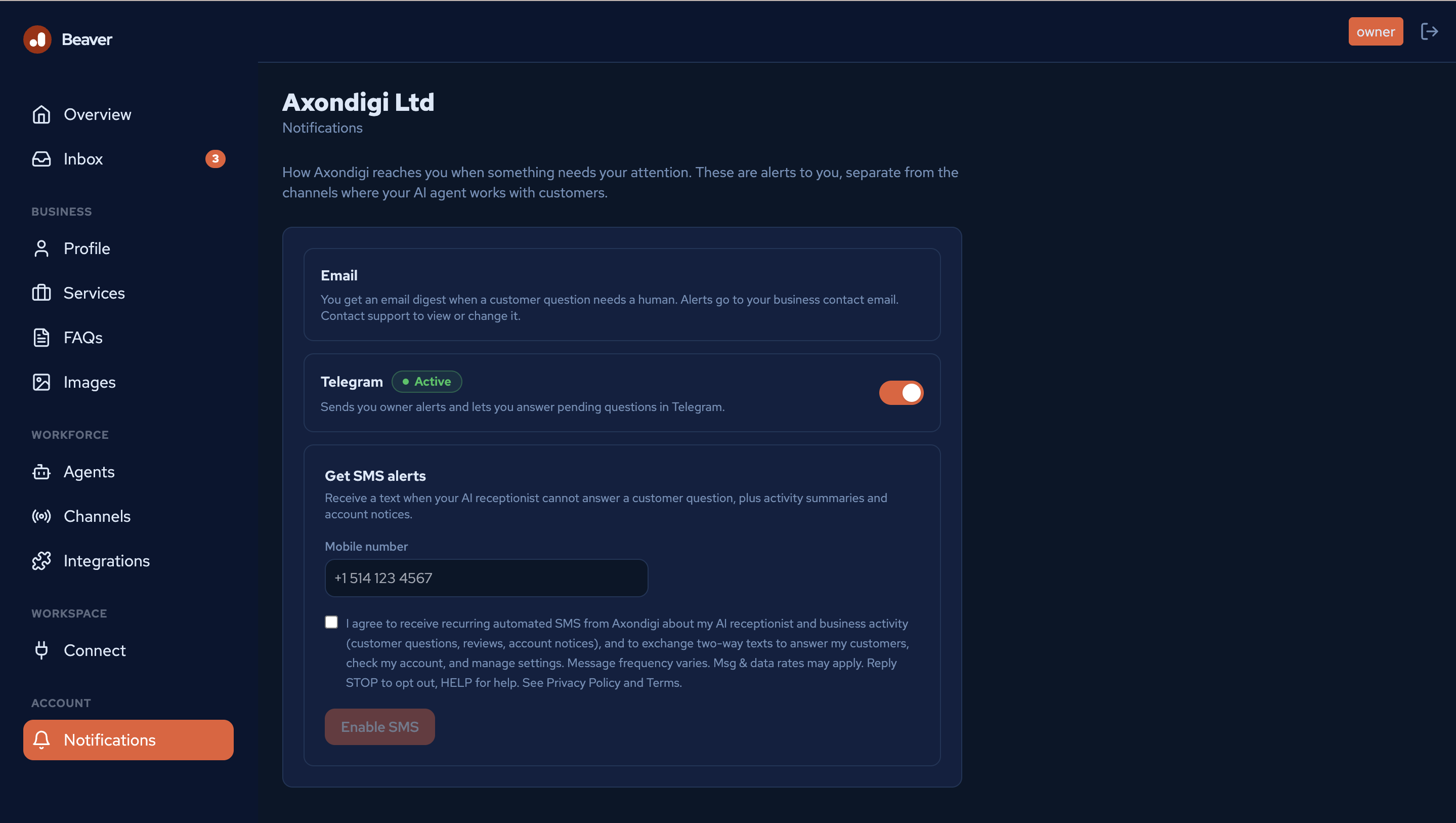
The consent box reads:
I agree to receive recurring automated SMS from Axondigi about my AI receptionist and business activity (customer questions, reviews, account notices), and to exchange two-way texts to answer my customers, check my account, and manage settings. Message frequency varies. Msg & data rates may apply. Reply STOP to opt out, HELP for help. See Privacy Policy and Terms.
What this program includes
Notifications we send you:
- Alerts when your AI receptionist cannot answer a customer question.
- New Google reviews.
- Booking and customer request notifications, if you use the receptionist feature.
- Account and service notices.
Two-way texting you can start:
- Reply to an alert to answer your customer’s question.
- Ask about your account and business activity.
- Make simple profile updates, such as closing for a day, marking an item sold out, or posting a short update. Every change waits for your YES and can be undone with UNDO.
- Send a photo to add it to your business gallery.
Sample messages:
- Axondigi (Q12): Customer asks: “Do you deliver on Sundays?”. Reply “Q12 <answer>” anytime, or open: https://business.axondigi.com/reply/…
- (You reply) Q12 Yes, Sundays 10am to 4pm
- Axondigi: Send this reply to “Do you deliver on Sundays?”? “Yes, Sundays 10am to 4pm” Reply YES to send.
- (You reply) YES
- Axondigi: Sent to customer. Thanks!
- Axondigi: new 5-star Google review: “Great pho and friendly staff” Reply: https://business.axondigi.com/review-reply/…
- Axondigi: You’re now enrolled to receive and reply to SMS about your AI receptionist. Msg frequency varies. Msg & data rates may apply. Reply HELP for help, STOP to cancel.
Message frequency and rates
Message frequency varies with your business activity. Standard message and data rates may apply, as charged by your mobile carrier.
How to opt out or get help
You can opt out at any time by replying STOP (or ARRET) to any message; you will receive one confirmation and no further messages. Reply START to resubscribe. You can also turn SMS off in your dashboard under Account > Notifications > SMS. For help, reply HELP (or AIDE) or email [email protected].
Privacy
Your mobile number and message content are handled in accordance with our Privacy Policy and Terms of Service. Mobile opt-in information and SMS consent are not shared with any third parties or affiliates for marketing or promotional purposes.